Huss Valley PC Controls
Understand the reported PC inputs, check the visible Alt Cursor label and use a focused checklist when an action does not work.
In this guide Jump to a section
Start with the input shown by your current game. The reviewed PC guide reports movement and a sideways dash, but its claim that Alt instantly stops movement conflicts with a source screenshot labelled “ALT · CURSOR.” Do not build an evasion routine around that disputed claim without checking it in your session.
This page is for the Huss Valley Official experience. It does not establish a phone or controller layout.
Reported PC inputs
| Action | Input reported by Pro Game Guides | Scope of the evidence |
|---|---|---|
| Movement | W, A, S, D | Published PC guide |
| Sideways dash | A or D with Space | Published PC guide; current timing not measured here |
| Interaction | E | Published PC guide; exact interaction conditions not tested here |
| Alt | Claimed as instant stop | Disputed by the cursor label below |
The source describes movement with acceleration and deceleration. That is a reason to observe where an action ends, rather than assuming that releasing a key immediately produces the position you intended.
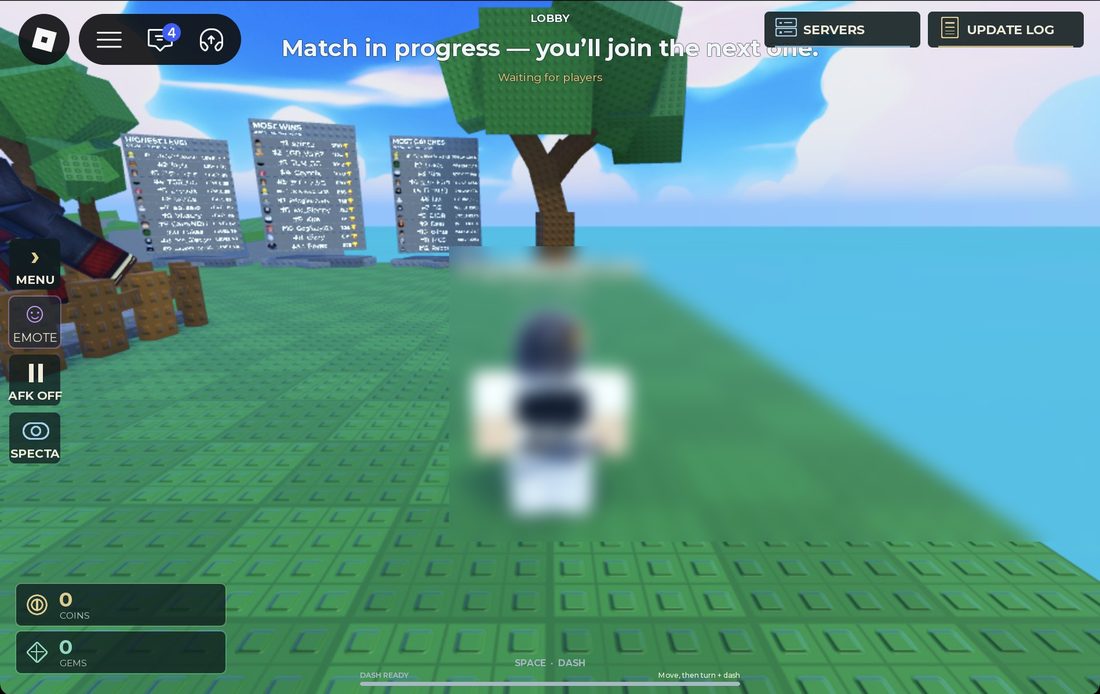
MMORocks source screenshot, reported checked October 3. Its bottom hint reads “SPACE · DASH” and “Move, then turn + dash.” This is a visible instruction in that capture, not a measured cooldown or a complete keyboard layout.
Use this image to locate an input hint, then compare it with your current screen. The Space label alone does not prove the precise direction, timing or end position of a dash. Check those separately when practising.
What the menu reference actually shows
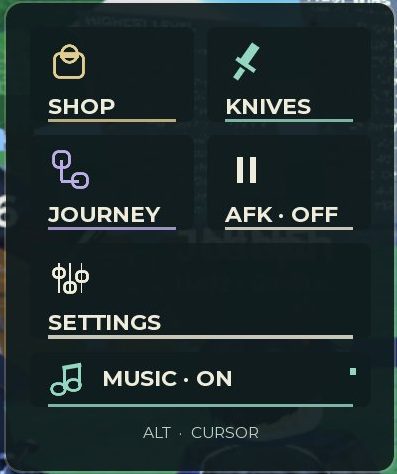
MMORocks screenshot, reported checked October 3, 2026. The bottom label reads ALT · CURSOR. This project inspected the image; it did not capture or test this interface in-game.
The visible label supports a cursor-related use of Alt in that interface. It does not prove how Alt behaves in every state, or establish that it can never have another effect. The useful response to the disagreement is a small, observable check.
Check a disputed action safely
When the current session gives you room to check an input:
- Read any visible hint or current control setting.
- Establish the ordinary behaviour first: make a short movement and observe what happens when you release the key.
- Repeat the same starting action with the disputed input.
- Record the visible difference, including whether the cursor changes.
- Keep the observation tied to that device and interface state.
Do not perform a check if it would interrupt another player's match. A private practice server is not assumed to be available.
Practise a dash as one action
Use the reported input as a starting point, then compare it with the current game's hint. Focus on three things: the movement before the input, the direction of the visible action and the position where you finish.
An action that activates is not automatically a useful action. Before repeating it near another player, look at the space it would put you into. The Runner guide develops that destination check; Chaser practice explains why maintaining a readable target matters.
If an input does not work
| What you observe | Check next |
|---|---|
| No visible action | Game identity, current hint and any remapped control |
| Input is captured by a menu or chat | Close the input field or menu and test the same action again when appropriate |
| Action goes somewhere unexpected | Compare starting movement and camera direction; do not assume both are irrelevant |
| A tutorial names buttons you cannot find | Confirm the device and experience before trying more combinations |
| It works sometimes | Record the conditions that differ; a cooldown or role restriction is a possibility to investigate, not a fact to invent |
What remains unmeasured
This edition does not supply a dash distance, cooldown, attack input, controller map or touch-button chart. Those require a current control screen or a recorded test for this exact experience. Supplying a familiar Roblox default would create an instruction that may not match your game.
For a correction, retain the game URL, device, settings and a short recording of the action. That evidence is much more useful than “the controls are wrong.”
Watch the chase. Find your next move.
Use a creator's video with the written guide and one question to check in your next session. Compare the experience and current controls before following an input.
HUSS VALLEY GUIDE! (BEST MOVEMENT, JUKE TIPS & PRO TRICKS) Roblox
By SpaceQT · Published
SpaceQT labels this as a movement and juking guide. Pair the video with the PC controls page and one Runner practice goal.
- Compare any displayed inputs with the hints in your current game.
- At a direction change, note the starting movement and the space the player enters.
- Check what happens after the action: is there still a usable next route?
Selection & review notes
Selected from the linked reference article. YouTube metadata and embed availability checked October 12, 2026; the footage and its gameplay claims have not been independently reviewed. The prompts are our viewing checklist, not verified video chapters.
Reference article that selected this videoMetadata checked . Video rights belong to the creator.
Click “Load video” to load YouTube's player; videos do not autoplay. If a player is unavailable, use “Open on YouTube”. Titles and availability were checked; gameplay claims still need verification.
Sources & image credits
Reviewed 12 Oct 2026. A source review is not an in-game test. Dated screenshots and practice suggestions are identified in the guide.
Source reports an October 3 game check. Five source screenshots were downloaded and visually inspected by this project: menu, currency counters, Items shop, update log and Runner Abilities cards. Image review on October 12 does not verify the live shop. Values and labels are dated screenshot observations; no source article prose is copied.
Source reports an October 3 game check and an October 4 article update. Lobby HUD and map-vote screenshots were inspected here October 12. Used for dated interface observations; source testing is not testing by this project, and the screenshots do not establish the current map rotation.
Article dated October 6. Used for reported role objectives and PC inputs. Its Alt instant-stop assertion conflicts with the cursor label in MMORocks' screenshot; some item classifications also conflict. No gameplay was performed by this project.
Artwork reused at the user's request. The source credits game art to Huss Valley Official / Roblox. Original image URLs and credits are preserved; no open licence is claimed.
Image credits (3)
Source lobby screenshot: the top message says you will join the next match; the bottom hint reads SPACE · DASH and Move, then turn + dash. MMORocks reports checking the game October 3, 2026; image inspected here October 12.
Original image source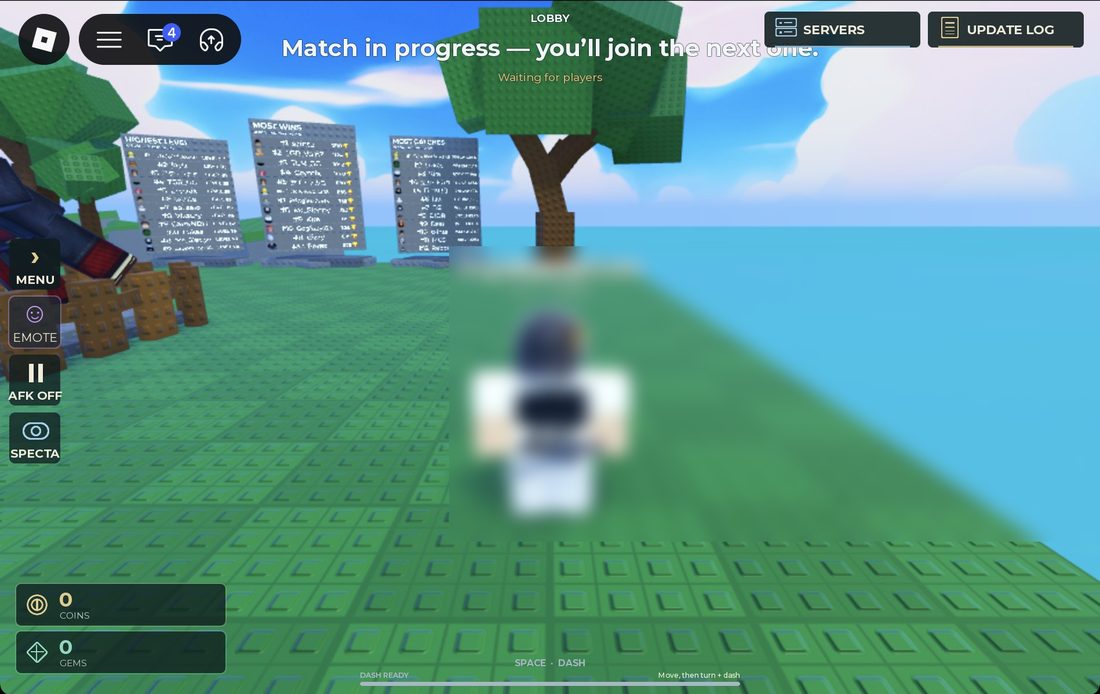
Reused at the user’s request for source-backed commentary. Rights remain with the original owners; attribution is not a licence claim.
Game icon artwork. Use the developer name and Roblox URL to confirm the experience.
Original image source
Reused at the user's request. Rights remain with the original owner; no open licence is asserted.
MMORocks source screenshot, reported checked October 3, 2026. The bottom label reads ALT · CURSOR; this project did not capture it in-game.
Original image source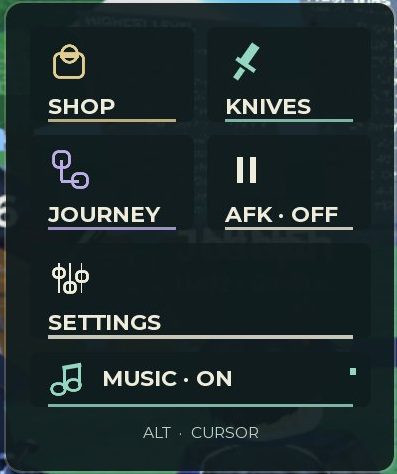
Reused at the user's request for source-backed commentary. Rights remain with the original owners; attribution is not a licence claim.
Found something different in your game? Send a correction with the experience URL, date and a screenshot.