
Huss Valley Abilities: Read the Shop Before Buying
Compare the three Runner cards visible in a dated shop screenshot and decide what evidence you need before spending Gems or Robux.
In this guide Jump to a section
Begin with a problem you want an unlock to solve, then read the current shop card. This edition has a dated screenshot showing three Runner ability cards; it does not present them as the complete current inventory or a tested tier list.
The screenshot reference
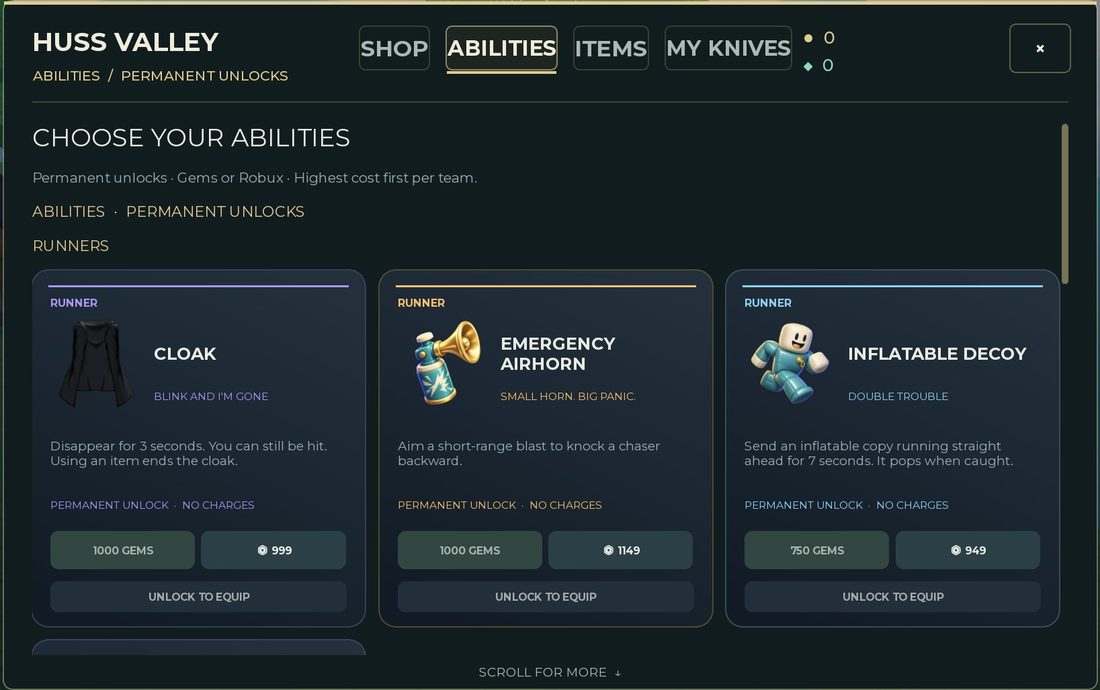
Screenshot: MMORocks, reported checked October 3, 2026. This project visually inspected the image. Prices below are screenshot values, not a live October 11 shop check.
The visible section is labelled Abilities / Permanent Unlocks and Runners. It distinguishes unlocks from items with charges and shows an unlock requirement before equipping.
| Visible card | Gem price in the screenshot | Robux price in the screenshot | Reported effect and limitation |
|---|---|---|---|
| Cloak | 1,000 | 999 | Brief invisibility; still hittable; using an item ends it |
| Emergency Airhorn | 1,000 | 1,149 | An aimed short-range push against a Chaser |
| Inflatable Decoy | 750 | 949 | A forward-moving copy that disappears when caught |
For exact duration and the current purchase terms, read your live card. The screenshot is useful for identifying and comparing the entries, but an old value should not override the shop you are about to pay in.
Why this page does not rank every named ability
The reviewed guides do not agree on all shop categories. In particular, entries treated as permanent abilities by one guide appear among item descriptions in another. Rather than merging the lists, this page keeps the clearly visible Runner cards together and leaves disputed classifications for a current-shop check.
If your shop shows different entries, record the tab and full card. The label and price need to be visible together; a cropped item name alone is not enough to settle its category.
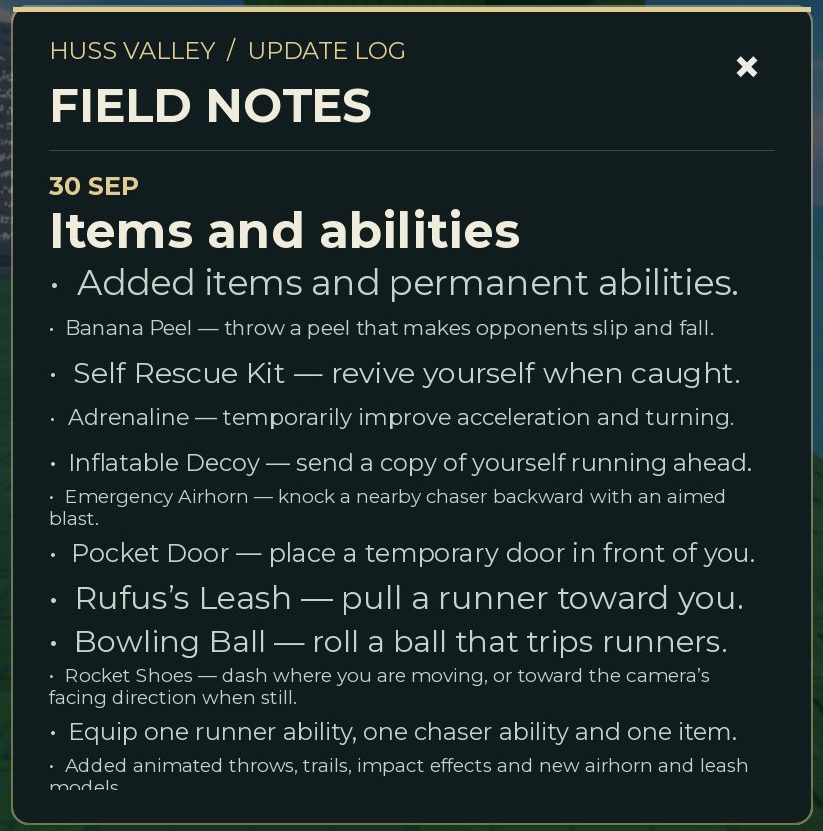
Dated source announcement. Several entries appear in the same update log, which is why the announcement alone is insufficient to classify them as permanent unlocks or consumable packs.
Use an update log to locate a named change, then use the actual shop tab and full card to understand the purchase. This avoids turning a mixed announcement into a misleading all-abilities list.
Choose by the situation you can recognise
Cloak: can you act on lost visibility?
The visible warning that you can still be hit matters to the purchase decision. If your plan depends on immunity, it does not match the card. Consider whether you can use a change in visibility while still choosing a sensible destination.
Before buying, ask: What would I do differently after activating it? If the answer is only “keep moving exactly as before,” identify a clearer use case first.
Emergency Airhorn: can you recognise the relevant approach?
An aimed, short-range effect asks something of the user. The purchase is easier to evaluate when you can describe the encounter where you want the push to matter.
Do not invent a safe activation distance from the words “short range.” Check the live description, then use a recorded test if you need a precise threshold.
Inflatable Decoy: is the copy relevant to your next decision?
Think about what you want to do while the copy moves. A distraction has a clearer job when you already have an intended route or action.
The lowest visible Gem price makes it a smaller saving target among these three cards. Price alone does not establish that it is the strongest choice for every player.
Before paying
Confirm all of the following in the current interface:
- The entry is in the category you expect.
- The purchase is an unlock rather than a charge pack.
- The role restriction matches the role you want to practise.
- You understand both the effect and the stated limitation.
- The selected payment currency and amount are correct.
If the button changes after purchase, check the equip state instead of assuming that buying also equipped it.
A purchase decision you can review
Write down the situation you wanted to improve, the effect you expected and one observation that would help you evaluate it. Keep that note while playing. It makes a later review about usefulness rather than whether the card sounded impressive.
Use Runner practice to identify a recurring decision, consumables to compare repeat purchases and progression to plan the budget.
Sources & image credits
Reviewed 12 Oct 2026. A source review is not an in-game test. Dated screenshots and practice suggestions are identified in the guide.
Source reports an October 3 game check. Five source screenshots were downloaded and visually inspected by this project: menu, currency counters, Items shop, update log and Runner Abilities cards. Image review on October 12 does not verify the live shop. Values and labels are dated screenshot observations; no source article prose is copied.
Article dated October 6. Used for reported role objectives and PC inputs. Its Alt instant-stop assertion conflicts with the cursor label in MMORocks' screenshot; some item classifications also conflict. No gameplay was performed by this project.
Artwork reused at the user's request. The source credits game art to Huss Valley Official / Roblox. Original image URLs and credits are preserved; no open licence is claimed.
Image credits (3)
MMORocks source screenshot, reported checked October 3, 2026. Values are a dated reference; compare your current shop before purchasing.
Original image source
Reused at the user's request for source-backed commentary. Rights remain with the original owners; attribution is not a licence claim.
Source screenshot of the 30 Sep update log. It documents what that announcement says, rather than proving the live effects or current equipment limits. MMORocks reports checking the game October 3, 2026; image inspected here October 12.
Original image source
Reused at the user’s request for source-backed commentary. Rights remain with the original owners; attribution is not a licence claim.
Game icon artwork. Use the developer name and Roblox URL to confirm the experience.
Original image source
Reused at the user's request. Rights remain with the original owner; no open licence is asserted.
Found something different in your game? Send a correction with the experience URL, date and a screenshot.