
Huss Valley Consumables
Choose between movement help, interruption and recovery using dated source reports, then check charges, role and current shop terms.
In this guide Jump to a section
Choose an item for a situation you can recognise during play. Then confirm its role, charges and current price before relying on it.
The reference facts below come from MMORocks' dated item report. The article reports three-charge packs and one equipped item at a time. This wiki has not checked current pack sizes or consumption rules in-game.
Three reported item types
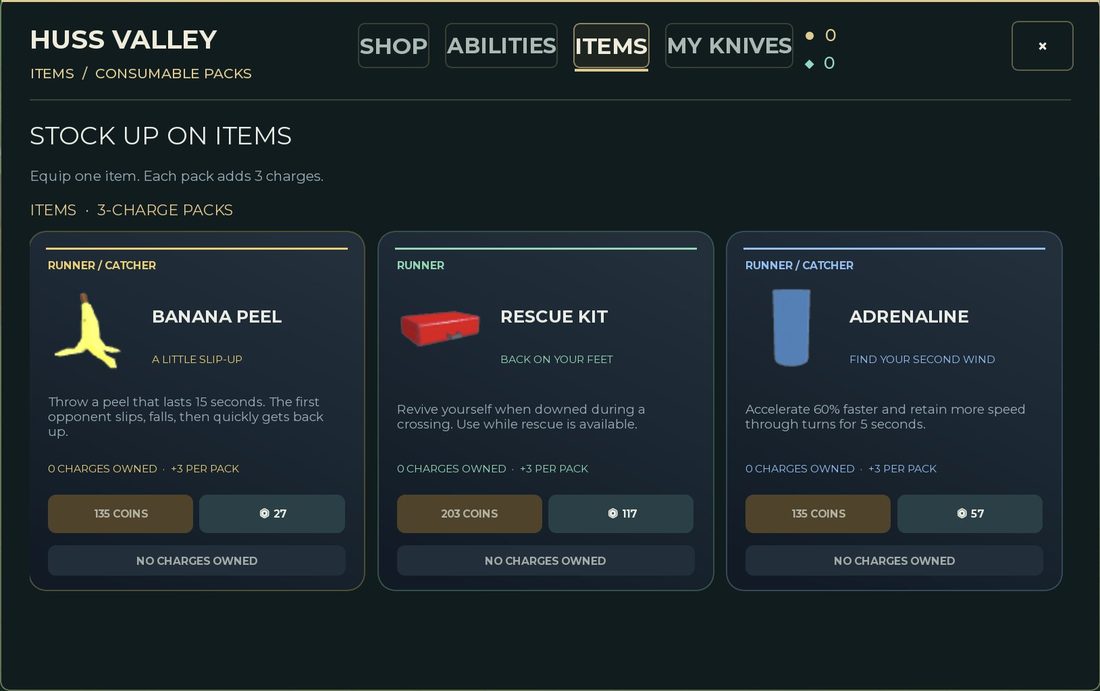
MMORocks source screenshot, reported checked October 3. The tab distinguishes consumable packs from permanent unlocks. Read your live shop before purchasing.
| Reported item | Job described by the source | Question before buying |
|---|---|---|
| Adrenaline | Temporary help with acceleration and turning | Do I know the movement problem I want it to change? |
| Banana Peel | Interrupt an opponent who contacts the peel | Can I recognise a relevant path before using it? |
| Rescue Kit | Recovery when a Runner is downed, while rescue is available | Do I understand the current rescue prompt and condition? |
These are functional summaries, not a claim that every item is equally suitable for every role. Compare the current card and category before spending.
Read a pack card in four passes
The source capture supplies a useful reading order:
- Role label: the Rescue Kit card is marked Runner; Banana Peel and Adrenaline show Runner / Catcher.
- Effect and condition: read the full description, including the rescue condition on Rescue Kit.
- Owned charges: the capture shows zero owned charges and three added per pack. Seeing a card does not mean it is ready to use.
- Payment: Banana Peel and Adrenaline show 135 Coins; Rescue Kit shows 203 Coins. Separate Robux payment options are also visible. These are dated screenshot prices.
The pack header describes one equipped item at a time. Together, those details explain why buying, owning charges and equipping should be checked separately. They do not establish whether today's shop uses identical terms.
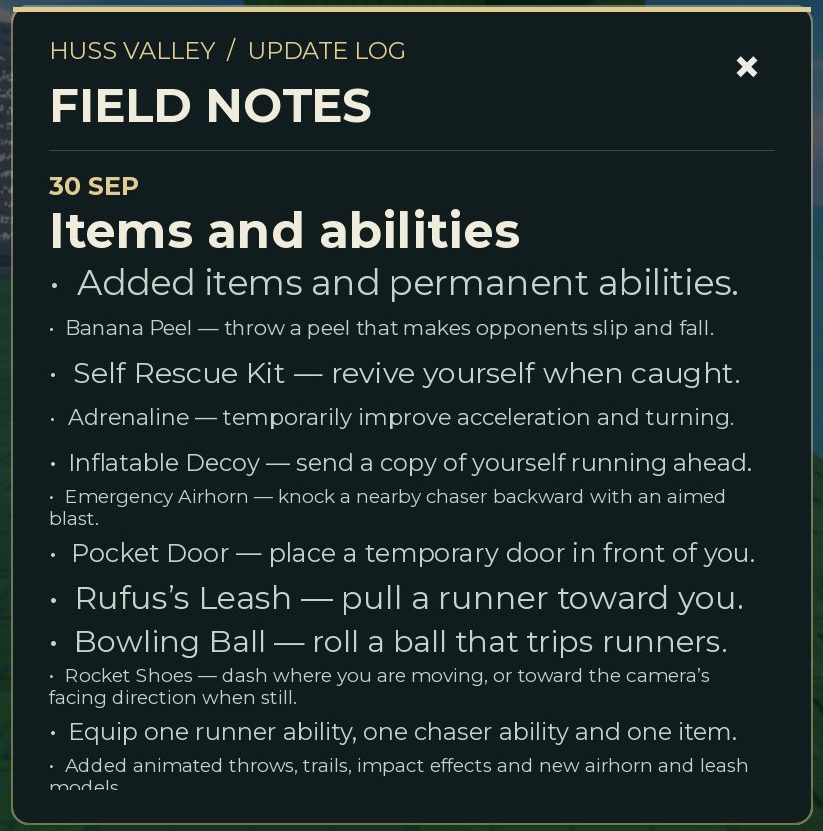
Source screenshot of the September 30 Field Notes announcement. It names items and abilities together; a mention in this log does not by itself establish an entry's current shop tab.
Use the announcement as a naming reference when a guide says “Self Rescue Kit” and the shop card says “Rescue Kit.” Then compare the full current entry. Do not infer a complete current inventory from a cropped announcement.
Match an item to a recurring problem
If a recurring failure involves your movement, first check whether the input behaved as intended. Temporary movement help is difficult to judge when you do not understand the baseline action.
If you want an interruption, decide what opportunity you are trying to create. “Use it whenever it is available” gives you little evidence about why it helped. A specific situation makes the outcome easier to review.
If you want recovery, read the current conditions closely. A recovery item is not permission to ignore route choices, and this edition does not establish an unlimited revive or an exact rescue window.
Check the inventory before the next match
- Open the relevant shop or inventory view.
- Read the selected item's category and role label.
- Check whether you own usable charges rather than merely seeing the card.
- Confirm the equipped item.
- Read the current activation prompt or control.
The existence of a shop entry does not prove that an item is purchased, equipped or usable in your current state. Keep those checks separate when something does not activate.
Review a charge after using it
Ask whether the situation you planned for actually occurred. Then ask whether the item produced the effect you expected. If you cannot tell, a clearer test is more useful than immediately buying another pack.
Your notes can be simple:
- Intended situation.
- Role and current item.
- Whether activation was visible.
- Observed result.
- Whether the charge count changed.
Do not infer a consumption rule from a single unclear outcome. A screenshot before and after the attempt can help identify what happened.
Keep repeat spending visible
Small packs can accumulate into a meaningful expense. Record how many packs you bought over a session and whether they helped the problem you chose. This is a personal spending review, not a fixed farming or return-on-investment formula.
For the distinction between permanent unlocks and item purchases, read abilities and spending decisions. For a practice goal, choose Runner or Chaser.
Sources & image credits
Reviewed 12 Oct 2026. A source review is not an in-game test. Dated screenshots and practice suggestions are identified in the guide.
Source reports an October 3 game check. Five source screenshots were downloaded and visually inspected by this project: menu, currency counters, Items shop, update log and Runner Abilities cards. Image review on October 12 does not verify the live shop. Values and labels are dated screenshot observations; no source article prose is copied.
Artwork reused at the user's request. The source credits game art to Huss Valley Official / Roblox. Original image URLs and credits are preserved; no open licence is claimed.
Image credits (3)
Source screenshot of the 30 Sep update log. It documents what that announcement says, rather than proving the live effects or current equipment limits. MMORocks reports checking the game October 3, 2026; image inspected here October 12.
Original image source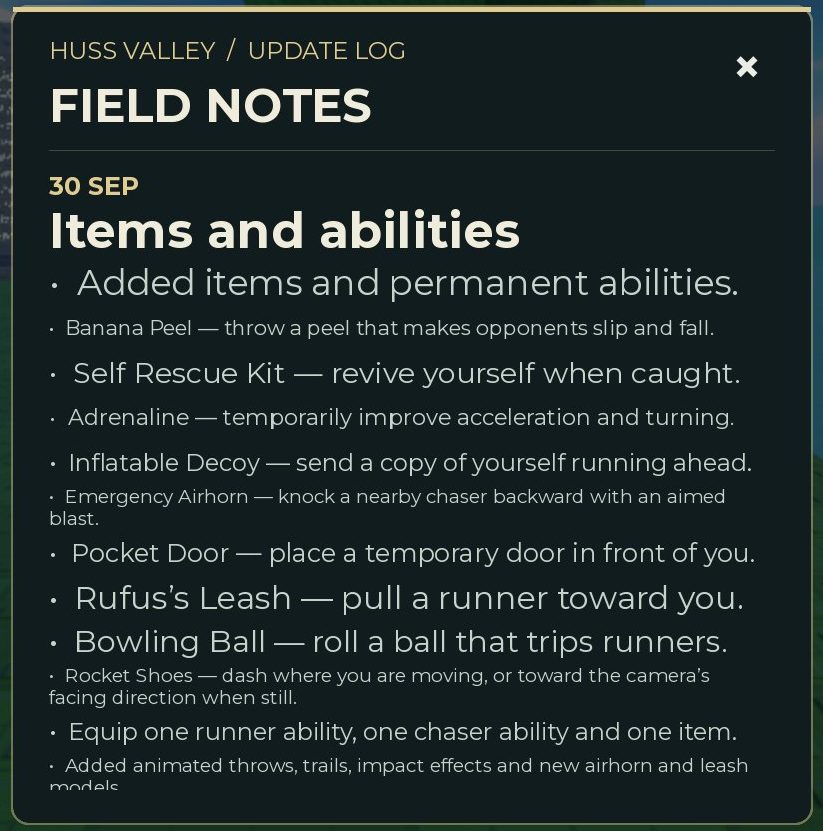
Reused at the user’s request for source-backed commentary. Rights remain with the original owners; attribution is not a licence claim.
Dated Items shop screenshot: header says Equip one item. Each pack adds 3 charges. The three visible cards carry role labels and Coin prices. MMORocks reports checking the game October 3, 2026; image inspected here October 12.
Original image source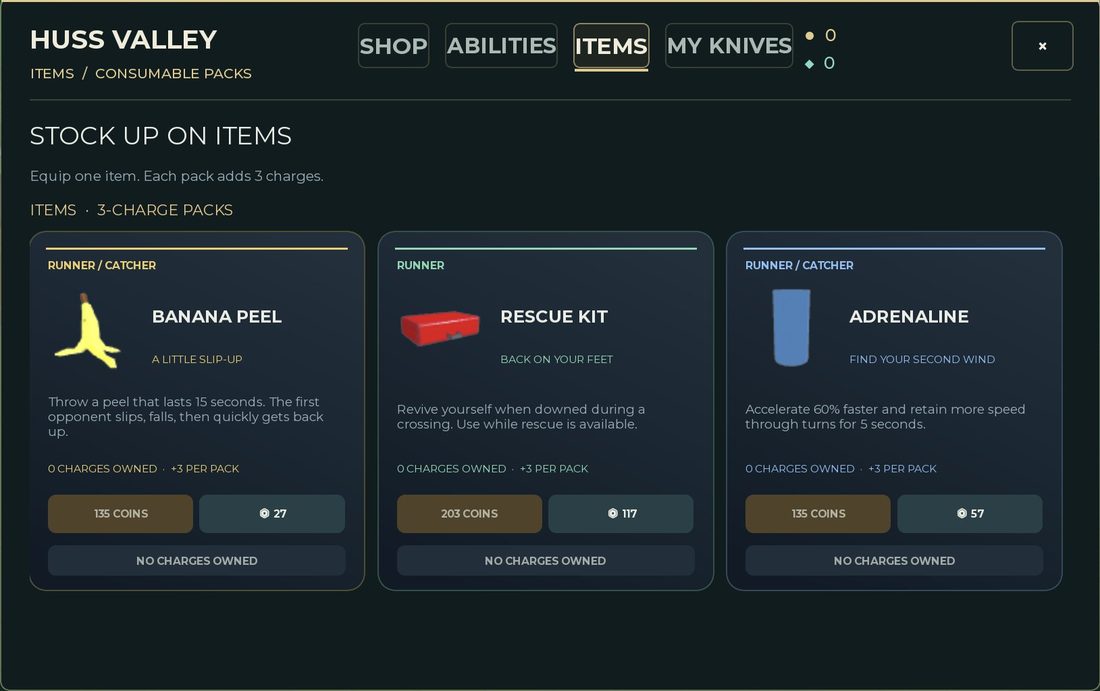
Reused at the user’s request for source-backed commentary. Rights remain with the original owners; attribution is not a licence claim.
Game icon artwork. Use the developer name and Roblox URL to confirm the experience.
Original image source
Reused at the user's request. Rights remain with the original owner; no open licence is asserted.
Found something different in your game? Send a correction with the experience URL, date and a screenshot.